The road trip, in one video.
Road trips are made of moments: the diner, the view from the pull-out, everyone asleep in the back seat. A slideshow puts them back in order.
Humble Video slides from one photo to the next like turning pages of a map, and plays your road trip songs back to back.

Free to try · Plus is $8.99, once
How to make it in Humble Video
- 1
Pick your photos
Tap New slideshow and choose photos (and video clips, with Plus) in the iPhone photo picker. Humble Video only sees the ones you pick.
- 2
Put them in order
Sort by date so the miles add up in order, and drop in short clips from the car (Plus).
- 3
Choose a song and export
A song is already chosen; change it if you like. Tap Export, and the video is saved to your Photos, ready to share or play on a TV.
Settings that suit it
Suggestions, not rules. Every setting can be changed any time.
- Shape
- Landscape
- Each photo
- 3 to 4 seconds
- Transition
- Slide, like the next stop coming into view
- Music
- Go to the Picnic, or your playlist songs from Files
A few tips
- Start and end at home: the first and last photos frame the trip.
- Mute clips with wind noise and let the music play through them.
- Make a vertical version for everyone who came along to keep on their phones.
Questions
Can I trim the video clips?
Yes, with Plus. Drag the handles to keep just the best few seconds, and choose whether the clip keeps its sound.
Can I use more than one song?
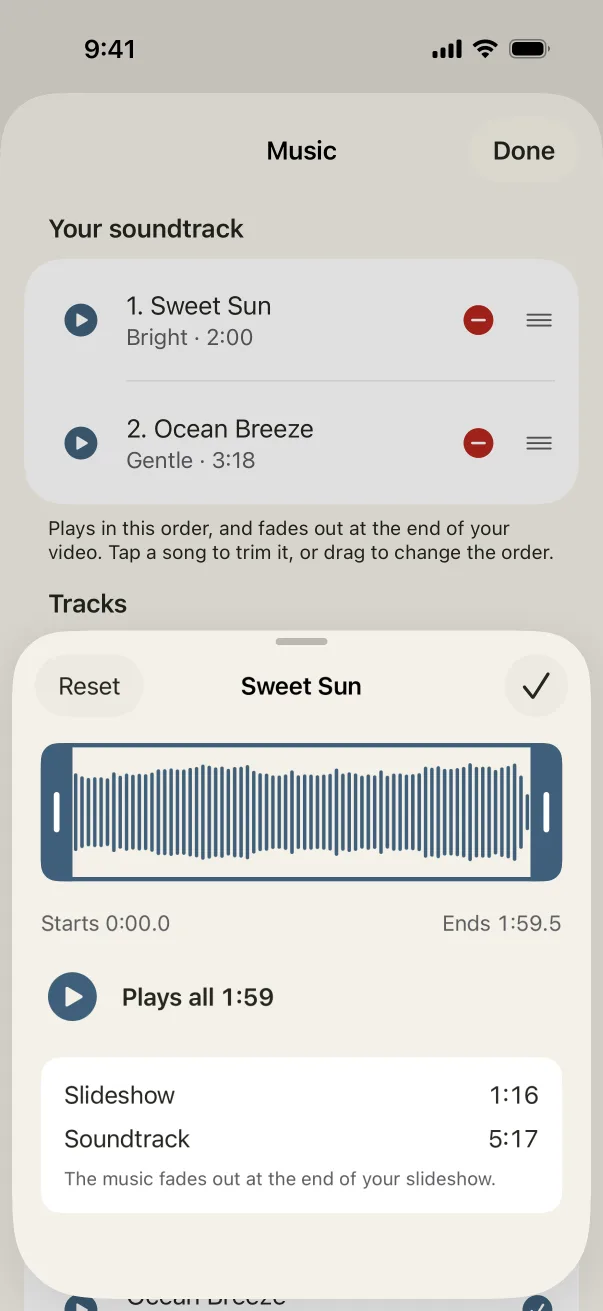
Yes. Add several songs and they play back to back, each trimmed to the part you want. The music fades out when the slideshow ends.
Is Humble Video free?
Free to try: up to 10 photos in a slideshow, every look and all the music, in 1080p with a small Humble Video mark. Humble Video Plus is $8.99, once, for video clips, unlimited photos and slideshows, 4K and no mark. No subscription. See pricing.
Are my photos uploaded?
No. The video is made on your iPhone or iPad. No account, no tracking, nothing uploaded. Privacy policy.

Make yours in a few minutes.
On iPhone and iPad. Free to try.